
Spending Account FAQs
Select a category to view frequently asked questions about what you’re looking for. Still have questions? Contact us at support@incommbenefits.com
Search by Topic
Health Savings Account FAQs
What is an HSA?
A Health Savings Account (HSA) is a personal savings account that lets you set aside money on a pre-tax basis to pay for qualified health expenses for yourself and your eligible dependents. You lower your overall healthcare costs by using untaxed dollars for health expenses. You can also invest and grow your HSA tax-free to pay for future health expenses.
Who can open an HSA?
Anyone can open an HSA with limitations on when you can contribute.
You can contribute only during months in which you are covered only by an HSA-eligible high-deductible health plan (HDHP) and are not claimed as a tax dependent on someone else’s tax return. There are other, rare limitations, consult with a tax professional if you have specific questions.
Who can contribute to an HSA?
Typically, you and/or your employer contribute to your HSA. The IRS restricts contributions to be made only for calendar months in which you meet two basic requirements:
- You are enrolled in a High Deductible Health Plan (HDHP)
- You do not have additional disqualifying coverage
Check with your employer or insurance that your health plan is HSA-eligible. Typical disqualifying coverage includes Medicare or another health insurance through your spouse that covers you and is not HSA-eligible.
Please consult your employer and tax advisor to make sure of your eligibility for contributions.
How much can I contribute to my HSA each year?
Contribution limits are announced by the IRS for each calendar year. Limits are different for self-only and family health coverage and may be reduced if HSA eligibility is only for part of the calendar year. Your contribution limit applies across all HSAs owned by you or your spouse. All contributions count irrespective of who made the contribution, you, your spouse, your employer, or anyone else.
InComm Benefits computes your contribution limit assuming InComm Benefits is your only HSA and you are HSA-eligible for the full calendar year.
For 2025 the IRS contribution limits are:
- Self-only coverage: $4,300
- Family coverage: $8,550
For 2026 the IRS contribution limits are:
- Self-only coverage: $4,400
- Family coverage: $8,750
If you will be 55 or older during the tax year, you are eligible for a $1,000 additional catch-up contribution. If your spouse is 55 or older and you have family coverage, your spouse may contribute an additional $1,000 but to a separate account opened in their own name.
You can find more details on contribution limits at the IRS website here.
Will I lose my money at the end of the year?
No, you will not. Once contributed, HSA funds are yours immediately and cannot be taken back. HSAs are different from FSAs and HRAs and are NOT “use it or lose it” accounts.
Your HSA is your personal account and stays with you after termination of employment with all your money in it. Contributions made by your employer are yours to keep and are not subject to vesting.
How and when can I spend my HSA funds?
Most HSAs provide you with a debit card that you may use to make purchases (InComm Benefits’ is special and extra awesome)! You may also reimburse yourself if you paid for a health expense with cash, or another card. Simply go into the app to create an expense and reimburse from your HSA to your Everyday account.
The IRS requires that eligible health expenses be incurred AFTER opening your HSA account. Note that the account does not have to be funded. So, once your InComm Benefits HSA has been opened, you can track your eligible expenses and then withdraw them from your HSA at any point in the future, tax-free.
Can I invest the money I have in my HSA?
Yes, of course! Investing the funds you have is a very smart financial decision. HSAs are the only account that offers you a Triple Tax advantage:
There are three basic requirements:
- Contributions are tax-free
- Investment growth is tax-free*
- Withdrawals for medical expenses are tax-free
To get started, tap on the investments tile on the app dashboard. To learn more, we have a FAQ specifically for investments located below. You can also read more about investments with InComm Benefits here.
*Note: growth is free from Federal taxes and most states as well. Check with your state to ensure how HSAs are treated for investment growth.
Can I get an additional card for my spouse (or other authorized person)?
Of course! Using the mobile app, the primary account holder can request an authorized card anytime.
IMPORTANT NOTES:
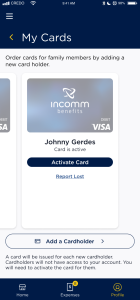
- The new card MUST BE ACTIVATED in the app by the primary card holder. Please do so after the card arrives in the mail. See below for detailed instructions.
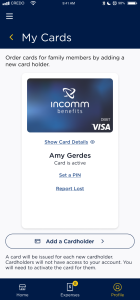
- You can view the additional cards on the My InComm Benefits card page by swiping to the left to see each additional card requested.
- Authorized cards are part of the primary account and as such do not receive a separate login for the app.
To get started: tap the menu icon and select “My Cards”
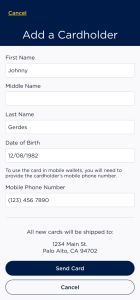
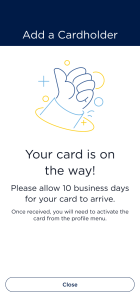
Next, hit the “Add a Cardholder” button, then provide the required information hit “send card” and the card will be mailed to the primary account holder address (expect 5-7 business days for delivery)
Once you have the card in your possession, you must activate it to enable in-store purchases with the card. On the My InComm Benefits Card Screen, swipe to the left to see the newly added card(s).
Once you see the card you wish to activate, tap the activate button.
Please note that only the primary account can access account information. Authorized users will not have access.
What are prior year contributions and how do they work?
Making an additional contribution to your HSA for the previous year could help reduce the amount of Federal tax you owe. This is typically called a “prior year contribution”.
How it Works
Between January 1 and the tax filing deadline for the year (April 15, 2026, for 2025 tax filings), you may make contributions up to the maximum amount you were allowed for the prior year, provided you were eligible to contribute. This is an excellent way to help reduce taxes in your 2025 filing because in general, those contributions will not be subject to Federal taxes. Your tax preparer or tax software may even ask if you have the ability to make this kind of contribution.
Example: Let’s say you were on an HSA for all 2025 on family coverage and your age was greater than 55. That would mean your 2025 yearly contribution limit would be: $8,550+ $1,000 catch-up = $9,550. So, if you have contributed LESS than $9,550in the calendar year 2025, you can contribute the difference all the way up to April 15, 2026. You could realize significant tax benefits by making the contribution, not to mention leveraging the HSA’s amazing triple-tax advantages.
There’s no better way to save money and InComm Benefits enables you to do just this in a snap! First, make sure your InComm Benefits everyday account has enough funds in it to make the contribution. Next, open the mobile app and tap on the HSA account. Then tap Edit Contributions. Then tap “Make a Contribution”. Type in the amount you wish to contribute and select the right tax year. Then tap “Contribute” and you’re done!
For more information you can check out more information on contributions consult your tax advisor or from the IRS here.
I have a 401k, why should I also contribute to my HSA?
It is a good idea to save in both your 401K and your HSA. You do not pay federal income tax on HSA or 401K contributions and investments grow free of federal tax in both HSA and 401K accounts.
The HSA is designed to pay for current health expenses as well as set aside money for future health expenses. It offers additional tax advantages and greater flexibility on withdrawals compared to 401Ks:
- HSA contributions do not incur social security and Medicare taxes (FICA), however 401K contributions incur these taxes.
- You can withdraw money from your HSA for qualified health expenses tax-free at any time, before or after retirement. Withdrawals from your 401K are typically after retirement and incur income tax; if you withdraw from your 401K before retirement, you pay additional penalties.
After age 65, you may withdraw money from your HSA for any purpose with no penalties and just pay income tax similar to a 401K. Unlike 401K’s, HSAs are not subject to any required minimum distributions.
Your employer may offer matching contributions on your 401K and may not offer the same on your HSA. A small number of states do not exempt HSA contributions from state income tax but then will not charge state income tax when you withdraw from your HSA for non-health purposes after age 65.
InComm Benefits does not offer tax advice, and you should consult your tax advisor in making this decision.
How does InComm Benefits determine eligibility with an HSA?
InComm Benefits offers a unique experience by providing unlimited use of your HSA card! With the option to link an HSA Backup account, we ensure you’re covered for both eligible and non-eligible expenses, making it simple to confirm eligibility or correct mistakes after a purchase.
Here’s how we determine eligibility, following standard industry guidelines:
- Eligible Expense (No Receipt Needed)
When you shop at a retailer who is an Inventory Information Approval System (IIAS) merchant, your purchase is automatically flagged as eligible. IIAS merchants use a point-of-sale system with pre-programmed eligible items (UPC or SKU numbers), which we recognize instantly. Since these items are pre-approved, you won’t need to submit a receipt. - Eligible Expense (Receipt Recommended)
Some retailers do not have an IIAS system but have been identified as having at least 90% of sales from prescriptions or eligible health-related items. In these cases, InComm Benefits will automatically approve your expense as eligible, but we recommend attaching a receipt for your records. For more details on how IIAS and 90% rule merchants compare, check out this chart. - Non-Eligible Expense
If you make a purchase from a retailer that isn’t an IIAS merchant or a 90% rule merchant, the expense will be deemed non-eligible. If you have funds in your HSA Backup account, the expense will be deducted from there. If your HSA Backup account doesn’t have enough funds, the expense will be charged to your HSA account. You’ll be prompted to review the purchase, and you can either provide documentation to prove its eligibility or move funds into your HSA Backup account to correct as a mistaken withdrawal.
What if I'm prompted to enter a PIN at checkout?
When you pay with your InComm Benefits card, you may be prompted to enter a PIN. For a seamless payment experience, follow these steps to avoid incorrectly declined transactions:
- Select “credit” on the PIN pad if that option is available.
- Press the green enter button, without entering a PIN, or any other numbers.
- If the first 2 steps don’t work, ask the cashier for assistance.
NOTE: When using your card at Walmart, you will be required to enter a PIN. They do not allow HSA or FSA cards to be used as “credit”. We recommend setting a PIN in the mobile app or website if you are a frequent Walmart shopper.
How do I set/reset my PIN?
You can set and reset your PIN from the mobile app or website by following these steps:
- Navigate to the “My Card” screen.
- Select the “Change PIN” option for the appropriate card.
- Enter a 4-digit PIN, then re-enter the same 4-digit PIN and Submit.
Your PIN is now set and can be used to complete transactions.
What if my transaction is declined?
When we detect a transaction decline, we will send you an email and push notification (if you have the mobile app and opted in for push notifications) providing an explanation and steps to fix the problem.
Generally, the primary reasons a card will be declined are:
- The card is not activated – For security reasons, all cards mailed to you are inactive. This ensures if your card is lost or stolen, it can’t be used. You can activate your card from the Mobile app or Website. Navigate to the “My Card” screen and select the “Activate Card” option for the appropriate card. Your card is now active and can be used for in-store and online purchases.
- Incorrect PIN – Some stores (particularly Walmart) require you to enter a PIN to use an HSA or FSA card. It’s common for people to forget their PIN. You can easily set/reset your PIN from the Mobile app or Website. See “How do I set/rest my PIN” above.
- Insufficient Funds – There may not be enough funds in your HSA account to cover the transaction. You can check your account balance from the Dashboard of the mobile app or website.
- No eligible items – If your purchase does not contain items eligible under your plan, the transaction will not be processed.
Why did I not receive a notification when my card was declined?
Some merchants have not yet complied with Visa/Mastercard guidelines on acceptance of some HSA and FSA cards and hence the card is declined by their point-of-sale systems and not InComm Benefits.
If you encounter such a situation, please send details of the store/merchant to support@InCommBenefits.com so InComm Benefits can advise you on any known problems. Please use an alternate payment method in this instance and reimburse your expenses from the InComm Benefits HSA app, as appropriate.
What if I lose my card?
You can report a card lost from the mobile app or website. Navigate to the “My Card” screen and select the “Report Lost” action for the appropriate card. We will cancel the current card and re-issue you a new one. New cards generally take 5-7 business days to arrive in the mail.
Why should I use InComm Benefits?
InComm Benefits is focused on helping you get the most out of your HSA. We have you covered whether you want to make it easy to purchase eligible items, find the maximum tax savings, reduce your need for receipt tracking, or maximize the growth of your HSA.
We do this by adding intelligence right into the InComm Benefits debit card – which is smart enough to spot medical expenses you may have missed. It is also smart enough to automatically create proof of purchase, which is usable if you are audited by the IRS, and they ask about your medical expenses. When InComm Benefits automatically finds an expense for you, we strongly believe that our process is correct, and we stand behind it with InComm Benefits’ Proof of Eligible Purchase (see below for more information).
Why does InComm Benefits come with an HSA and an HSA Backup account?
InComm Benefits provides two accounts when you sign up, both owned by you – one HSA and one we call HSA Backup. The HSA Backup account is much like a traditional checking account that you would have at your main bank. You can move money freely between the HSA Backup account and any of your regular bank accounts using the InComm Benefits mobile app. The InComm Benefits debit card is associated with both accounts, and the card is smart enough to identify medical expenses and charge those to your HSA account, while other expenses get charged to your HSA Backup.
For example, let’s say you head to the drugstore and buy aspirin, a box of band-aids, a bottle of water, and a package of potato chips. If you use the InComm Benefits card to pay for all these (just one swipe!), then we can determine which of those are medical expenses and which are not. Perhaps you knew which items were eligible, or perhaps not. Either way, we spot the eligible items and get you the tax savings. This is all done in real-time and then we simply take the correct amount out of each account (HSA or HSA Backup) while the card pays the bill in a single transaction. Magic!
What is InComm Benefits' Proof of Eligible Purchase?
InComm Benefits’ Proof of Eligible Purchase generates a proof of purchase document for each allowable expense that has been automatically identified using the InComm Benefits card. This can be provided if the IRS challenges the validity of a qualified medical expense in an audit. If the IRS denies the validity of the expense, InComm Benefits will pay the penalty that the IRS may assess on that expense.
How can I get started with InComm Benefits?
The best way to get InComm Benefits is for your employer to offer it as part of its benefits package. Talk to your HR team and have them reach out here. This allows you to benefit the most from pre-tax contributions through payroll.
We are accepting interest from individuals here who want their own account without employer sponsorship – and will reach out when we make this available.
HSA Backup Account
What type of account is the HSA Backup Account?
The HSA Backup Account is linked to your InComm Benefits Visa card and works like a checking bank account. It is not a tax-advantaged account and is not governed by IRS regulations but is covered by our standard terms and conditions such as FDIC insurance. It allows you to cover expenses as described above, and to receive funds as reimbursement from your HSA.
How do I get money into (or out of) my HSA Backup Account?
You will need to link an external bank account (checking or savings) to InComm Benefits. InComm Benefits uses Plaid, an industry leader in secure financial account connections, to authenticate your connection with your bank.
Once linked with your external bank account, you can easily transfer funds into the account one time or set up a recurring inbound transfer. Fund transfers can take 3-5 business days to complete. Similarly, you can transfer funds from the HSA Backup Account to your external bank account using the InComm app or web experience.
Do I need to enroll in the HSA Backup Account?
No, there’s no need to enroll separately for the Backup Account. The HSA and the HSA Backup Accounts both get created when you sign up for the HSA and are ready to use concurrently.
Is there an administrative fee to use the HSA Backup Account?
The HSA Backup Account comes with no fees.
Do all InComm Benefits accounts come with an HSA Backup Account?
Currently, the HSA Backup Account is provisioned only for HSA account holders, and both are owned by the individual employee. FSA account holders do not get the HSA Backup account.
Does each authorized card user get a separate HSA Backup Account?
No, all cards will draw from the same HSA and HSA Backup Account.
Only one external bank account can be linked at a time, but you can update your banking information at any time through the app under your HSA Backup Account.
How is the HSA Backup Account used for reimbursements?
Funds can be transferred from your HSA to the HSA Backup Account for specific reasons, such as reimbursements of travel expenses or reversals of excess personal contributions, and such transfers are immediate.
Is there a daily withdrawal limit?
There are daily ($5,000), weekly ($10,000), and monthly ($15,000) limits on transferring funds to or from the HSA Backup account.
HSA Optimization
Am I required to optimize my HSA?
No, you are not required to optimize your HSA. All the powerful features that support HSA optimization are available even if you choose not to go through the optimization flow. You can fund your HSA Backup account and still get:
- Single Card Convenience: Say goodbye to juggling multiple cards. You can use your InComm Benefits card at checkout for all your purchases, whether they are qualified medical expenses or not.
- Find Eligible Expenses: Our smart system helps you find eligible expenses you might otherwise miss during your everyday shopping, ensuring you fully utilize your tax-free HSA dollars.
- Get 2% Cash Back:* For added value, your InComm Benefits card offers 2% cash back* on all purchases.
Why does InComm Benefits highly recommend optimizing your HSA?
- Tailored Guidance: The experience provides you with the specific, step-by-step actions you need to complete to set up your account perfectly for one of our three optimized spending strategies: Investor Shoebox, Spend Now Contribute Later, or Keep it Simple.
- Full Optimization: While our platform offers advanced features by default (like automatic expense tracking and the HSA Backup account), customizing ensures your account settings and preferences are fully aligned with your unique HSA goals. This unlocks the maximum potential of your HSA, whether you’re focused on long-term investing, cash flow management, or simply convenient everyday spending.
- Simplified Setup: It simplifies the process of getting your account configured to operate in your preferred mode, guiding you through what might otherwise be complex setup steps.
In short, while you can use your InComm Benefits HSA without optimization, the optimization experience empowers you to activate and truly leverage the specific strategies designed to meet your individual financial objectives.
Investor Shoebox Strategy
How do I fully optimize my HSA for the Investor Shoebox strategy?
The Investor Shoebox strategy is designed to maximize the long-term growth of your HSA funds through investment, leveraging its unique triple tax advantage. We will guide you through all these steps once you select an HSA Optimization strategy in the app. To be prepared, you will follow these simple steps:
Step 1: Fund Your HSA Backup Account
The core of this strategy relies on your HSA Backup account. This account functions just like a regular checking account and will be used to pay for your immediate out-of-pocket medical expenses, allowing your HSA funds to remain invested.
Action: From the app, tap “Connect” to link your external bank account and complete a one-time or recurring transfer into your HSA Backup Account to ensure it stays consistently funded. Learn more about linking your external bank account.
Step 2: Set Up Your HSA Investment Account
This is where your long-term growth happens! Your primary goal will be to invest most, if not all, of your HSA contributions to allow them to grow tax-free over time.
Action: From the app, tap “Open” to open your HSA investment account. You’ll then choose from a wide range of investment options that best align with your personal financial goals and risk tolerance. (For detailed guidance, please refer to our comprehensive HSA Investment Guide.)
Step 3: Automate Your Investment Contributions
This “set it and forget it” approach ensures you’re consistently maximizing your tax-free growth.
Action: When transferring funds into your HSA investment account, you can set up a recurring transfer from your HSA spending account directly into your HSA Investment account. Learn more about setting up a recurring transfer.
Step 4: Pay for Expenses with Your InComm Benefits Card
Use your card worry-free and build your future reimbursement pool.
Action: Use your InComm Benefits card for ALL your out-of-pocket expenses especially at locations where medical expenses are likely (e.g., pharmacies, drug stores, doctor’s offices). Our system intelligently identifies eligible medical items for you. We’ll automatically pay these from your HSA Backup account and will track and store all your health-related spending for you.
Step 5: Reimburse Yourself Later (Anytime!)
The “secret” power of the Investor Shoebox strategy: there is no time limit on when you can reimburse yourself for qualified medical expenses you’ve incurred.
Action: From the Expenses screen in the app, you will see a collection of all your tracked health expenses. You can choose to reimburse yourself weeks, months, years, or even decades into the future from your HSA directly to your personal bank account.
What are the key advantages of the Investor Shoebox strategy?
- Maximum Tax-Free Growth: By paying out-of-pocket expenses from the HSA Backup account and letting your HSA funds remain invested, your money can grow significantly through compounding, completely free from taxes.
- Future Financial Resource: Whether you choose to save the funds for significant healthcare costs in retirement, or if you decide to reimburse yourself for past expenses, the money returned to your personal bank account can then be used for any purpose you choose, effectively becoming a flexible, tax-free source of funds in the future.
- Hassle-Free Record Keeping: InComm Benefits handles the detailed tracking of your eligible expenses, making future reimbursements simple.
Spend Now Contribute Later Strategy
How does the Spend Now Contribute Later strategy work?
This strategy is perfect if you want to limit your regular payroll contributions, keeping more money in your paycheck each period, while still receiving some of the tax advantages of contributions. We will guide you through all these steps once you select an HSA Optimization strategy in the app. To be prepared, you will follow these simple steps:
Step 1: Fund Your HSA Backup Account
The core of this strategy relies on your HSA Backup account. This account functions just like a regular checking account and will be used to pay for your out-of-pocket expenses, limiting the need for regular contributions to your HSA.
Action: From the app, tap “Connect” to link your external bank account and complete a one-time or recurring transfer into your HSA Backup Account to ensure it stays consistently funded. Learn more about linking your external bank account and setting up a recurring funds transfer.
Step 2: Pay for Expenses with Your InComm Benefits Card
Use your card worry-free, and we’ll track your health-related spending for you.
Action: Use your InComm Benefits card for ALL your out-of-pocket expenses, especially at locations where medical expenses are likely (e.g., pharmacies, drug stores, doctor’s offices). Our system intelligently identifies eligible medical items for you. We’ll pay these from your HSA Backup account, and track and store all your health-related spending for you.
Step 3: One Click Post-Tax Contribution
You’ll make a lump sum, post-tax contribution to your HSA equal to your accumulated unreimbursed health expenses from the previous year, which will be immediately reimbursed to your linked bank account.
On January 1st, we’ll notify you to visit the app and make your one-click contribution for the previous year. You’ll need at least $1.00 in your HSA Backup account to complete this. Be sure to finalize this action before the IRS tax filing deadline (typically April 15th) for the prior year. Immediately after your contribution, we’ll reimburse the exact amount back to your personal bank account. This contribution will be included on your updated Form 5498-SA, effectively decreasing your taxable income.
What are the key advantages of the Spend Now, Contribute Later strategy?
- Cash Flow Control: You keep more money in your pocket throughout the year, improving your immediate financial flexibility.
- Tax Benefits on Demand: Even though you’ll contribute “later,” this action will be reflected as a contribution on your Form 5498-SA, which you then use to claim a deduction on IRS Form 8889 when you file your taxes, ultimately decreasing your taxable income for the previous year.
- Informed Future Planning: By tracking your actual spending, you gain a clearer picture of your annual health expenses, which can help you make more informed decisions about your payroll contributions for the following year. Remember, making contributions directly from payroll is generally the most advantageous, as it reduces your Federal tax obligation as well as your payroll taxes.
What happens if I don’t make the one-click contribution before the IRS tax deadline?
If you miss the IRS tax filing deadline (typically April 15th) for making your prior-year contribution:
- No Loss of Reimbursement Potential: The qualified health expenses you’ve accumulated will roll over, and you retain the ability to make the one click contribution for the current tax year.
- Continued Tracking: You can continue to use your InComm Benefits card. We’ll keep tracking and accumulating all your eligible health-related expenses, adding them to your pool of unreimbursed expenses.
Keep it Simple Strategy
Who is the Keep It Simple strategy for?
This strategy is perfect for providing effortless spending and peace of mind for your day-to-day healthcare expenses, without the hassle of manual tracking or worrying about eligibility and fund availability.
We will guide you through all these steps once you select an HSA Optimization strategy in the app. To be prepared, you will follow these simple steps:
Step 2: Pay for Expenses with Your InComm Benefits Card
Simply use your InComm Benefits card for all your health-related purchases.
Action: Use your InComm Benefits card for ALL your out-of-pocket expenses, especially at locations where medical expenses are likely (e.g., pharmacies, drug stores, doctor’s offices). Our system intelligently identifies eligible medical items (like prescriptions, doctor visits, or qualified over-the-counter items) for you. We’ll pay eligible items from your HSA and non-eligible items (like shampoo, detergent, or toilet paper) from your HSA Backup account.
What are the benefits of the Keep it Simple strategy?
- Prevent Declines & Maintain Access: Your HSA Backup account acts as a safety net. If your HSA funds are ever low or depleted, transactions for eligible expenses won’t be declined. Instead, they will be paid from your HSA Backup. We’ll automatically create an expense record for you, allowing you to easily reimburse yourself from your HSA once funds become available (e.g., after your next contribution).
- Effortless Expense Tracking: All your health-related spending, whether from your HSA or HSA Backup, is automatically tracked and recorded by InComm Benefits. This provides a clear overview of your healthcare expenditures, which can be incredibly helpful when planning your HSA contributions for the following year.
HSA Investment FAQs
Please review the following frequently asked questions to help jump-start your path to investing your HSA dollars. For a full list of all the available investment options for the InComm Benefits HSA account, visit our partner site:
How do I get started?
Getting started with investing is easy:
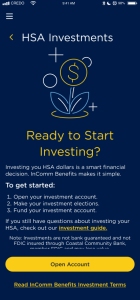
- Open an account (takes 1-2 days to complete)
- Review investment options and set your future investment elections
- Transfer funds from the HSA spending account to the HSA investment account
To open an account, tap on the Investment tile on the dashboard and then tap “Open account” on the next screen. It’s that simple. In 1-2 days, your account will be open and ready for you to invest. In the meantime, you can research the investment options available to you so that you can set your elections next.
What are future investment elections, how do I set them, and why are they important?
Future investment elections determine how money is allocated between mutual funds when money is moved into your HSA investment account. It also allows you to send funds to the Charles Schwab HSBA account, if you choose to set one up. Once you set your investment elections, new money transferred to your HSA investment account will be automatically invested based upon the funds and percentages you have pre-selected. If you do not have future investment elections set prior to money being moved to your HSA investment account, money will be placed in the money market fund (Schwab Government Money Inv – SNVXX) and will remain there until you realign your account or transfer that money to another fund. You may wish to consult with a financial professional for help creating an asset allocation that works for you.
To learn more about setting your future investment elections, visit our investment elections guide.
How do I move money from my HSA spending account to my HSA investment account?
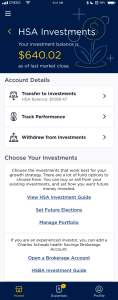
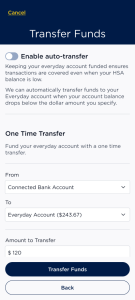
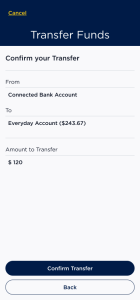
There are two ways to transfer money into your investment account – a one-time transfer and an automated transfer. An automated transfer makes it easy to set a minimum balance in your spending account and automatically transfer any funds above this minimum. Note: your actual screens may differ slightly from the examples provided here.
To get started, from the InComm Benefits dashboard screen, tap the investments tile.
How often is my investment balance updated?
Your investment balance is updated once per day around 5:30 PM PT on the days that the New York Stock Exchange is open. You can see the NYSE calendar here. Note that when you move money from the investment account, the money is debited from your investment account immediately and it may take 1-2 days for the money to arrive and update in the spending account.
How do I transfer money between investments in my investment account?
From the Investment section of the InComm Benefits mobile app:
- Tap on Invest your HSA funds and tap Manage Portfolio.
- Tap Transfer between investments option
- On the Select Transfer Type page, tap whether to Transfer Using Dollars or Transfer Using Percentages. Note: If you wish to transfer more than 90% of the balance out of a fund, it is recommended to use the Transfer Using Percentages option.
- On the Select Transfer Source(s) page, pick which fund, or funds, to move dollars from (i.e. $150 from Fund A, $200 from Fund B, etc.) or which fund, or funds, to move percentages from (i.e. 100% of your dollars in Fund A, 50% from Fund B, etc.) and click “Continue”.
- On the Select Transfer Destinations(s) page, pick which fund, or funds, to move dollars to (i.e. $150 to Fund C, $200 to Fund D, etc.) or which fund, or funds, to move percentages from (i.e. 100% of your dollars to Fund C, 50% to Fund B, etc.) and click “Continue”.
- On the Review Your Transfer Page, review your request and click “Complete Transfer” to complete it.
How do I move money from my HSA investment account back to my HSA spending account?
- From the Investment section of the InComm Benefits mobile app:
- Tap on Move money back to HSA and tap transfer money from HSA investments.
- Enter the dollar amount you want to transfer from your HSA investment account back to your HSA spending account.
- Tap the ‘Submit Request’ button to complete your request.
- Your HSA investments will be liquidated on a pro-rata basis based on your balance by fund to generate the cash to complete the request.
Note: Requests resulting in the liquidation of 90% or more of a mutual fund will be processed based on the number of units calculated using the previous market day’s NAV.
It can take 1-2 business days to move money from your HSA investment account into your HSA spending account.
What investment options are available through my InComm Benefits HSA?
You may review the investment options from the Investment Options Guide. The fund options guide provides historical performance information, fund category, and the gross expense ratio for each fund. For more in-depth information concerning the funds offered, you may also view each fund’s prospectus, fact sheet, and Morningstar® page by using the Resource Links in the fund options guide.
In addition, if you are an experienced investor, you can open a Charles Schwab Health Savings Brokerage Account (HSBA). This allows you to invest in securities other than what is offered in the main InComm Benefits Investment account. You can learn more below.
Can InComm Benefits help me select the investments?
No. Your HSA investment account is self-directed. This means you select the investments that are right for you. To help you make your selections, we provide details on Investment Options to help understand each investment option’s performance as well as links to the mutual funds’ prospectuses and fact sheets. You may also obtain a prospectus directly from the mutual fund company through the fund’s website. You may wish to speak with a personal investment advisor if you still have questions.
Are my investments insured by the FDIC like my InComm Benefits spending account?
No. Investments in the InComm Benefits Investment account, like all mutual funds, are not insured by the FDIC. Mutual funds may lose value. It is your responsibility to understand the risks of investing your HSA dollars. If you still have questions, you may wish to work with a personal investment advisor.
Is there a minimum amount I must invest?
InComm Benefits believes investing HSA funds should be easy to achieve and available to everyone. With InComm Benefits, you have the freedom to start investing with as little as $5 and invest all the way up to your entire HSA balance.
Do any commissions, loads or fees apply to the mutual funds available through my HSA investment account?
The mutual funds available through your HSA investment account are load-waived or no-load funds. Typically, this means there are no transaction fees to buy, sell funds, or transfer money to or from your HSA investment account. However, fees are typically built into the operation of the investments themselves. To find these, review the Investment Options and look for and look for “Prospectus Gross Expense Ratio” for each investment you consider. Also, see here to learn more about fees that InComm Benefits may assess.
To curb market timing practices, certain funds may impose short-term redemption fees or trading blocks. For information on whether a fund assesses short-term redemption fees or blocks, as well as the specifics concerning these see Investment Options and each fund’s prospectus.
What is a frequent trading policy and how do I know if a fund has one?
If you see an alert icon next to a fund when you realign your account or transfer between investments, hover over the icon to see the trading policy that applies to that fund. See the example below:
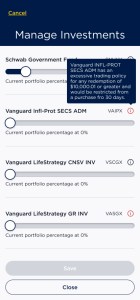
Are there fees for having an investment account?
InComm Benefits assesses a fee every quarter for investing in the pre-selected set of investments. The fee is calculated on a percentage basis and assessed based on the valuation on the last day of each quarter (March 31st, June 30th, September 30th, December 31st), equating to 0.125% or $1.25 per $1,000. The fee is deducted pro rata from the HSA investment account on or about the 10th business day following the end of each quarter. Mutual funds will be sold proportionately to the asset allocation in place on these dates. Accounts opened during the quarter are assessed the full 0.125% for that quarter.
If you open a Health Savings Brokerage Account (HSBA) through InComm Benefits with our partner Charles Schwab, there are no fees assessed by InComm Benefits. Charles Schwab may assess fees depending on your investment activity on that platform. Please check the account documentation if you open an HSBA.
I still have questions about the InComm Benefits HSA investment account. Who should I contact?
If you have questions about your HSA investment account after reviewing these frequently asked questions, please contact InComm Benefits Support, at support@incommbenefits.com.
What is InComm Benefits' Health Savings Brokerage Account (HSBA)?
If you are an experienced investor, InComm Benefits offers an HSBA from Charles Schwab to provide you with a powerful and flexible investment account that can be easily tailored to your needs. The HSBA is a full investment account with a full complement of research, analysis, and trading capabilities. However, there are a few important points to keep in mind:
- In order to use an HSBA, you must first open an InComm Benefits investment account
- Opening the HSBA can be started in the InComm Benefits app, and completed at Schwab in a few minutes
- Money can only be moved into and out of the HSBA via the InComm Benefits investment account – transfers from other accounts are not permitted
- To move money to the HSBA, set your future elections to Charles Schwab HSBA
- To move money back to InComm Benefits, you must first sell investments in the HSBA to create the cash pool to move. Then, you can move the funds back to InComm Benefits.
You can also review these two documents from Schwab to help understand more:
How do I get started with my HSBA?
See the following detailed steps to complete the HSBA account opening process:
- Open your InComm Benefits investment account first (see the investment section above for instructions).
- Once you have received an email notification that the InComm Benefits investment account is open, navigate to the Invest tab in the InComm Benefits app and tap “Open a brokerage account” at the bottom of the screen to open the section and then scroll down and tap the “Open a brokerage account” link. This will open a new page to begin the signup process for the HSBA account.
- If you already have set up a Charles Schwab HSBA account, you press the Log in button here to access your HSBA.
- If this is your first time setting up an HSBA press the Sign Up button – taking careful note of your HSA Plan ID and Plan Password as these will be used later.
- Pressing Sign Up will take you out of InComm Benefits and to Charles Schwab to complete the process for opening the account.
- Follow the instructions at Charles Schwab to complete the account opening.
- Important information you will need:
HSA Plan ID = 217743
HSA Plan password = 7113
- You will be notified by Charles Schwab when the account is ready. Once notified, set up your InComm Benefits Future elections for the newly created HSBA. This will automatically transfer to the Charles Schwab HSBA any funds you move your HSA spending to the HSA investment account. See the elections guide, or FAQ for more information.
- Next, move funds from your InComm Benefits HSA spending account to the InComm Benefits Investment account. If you have set your future elections as described above, the funds will flow automatically to your HSBA.
Flexible Spending Account FAQs
What is an FSA?
A Flexible Spending Account (FSA) is a tax-advantaged savings account many employers in the United States offer. It allows you to set aside a portion of your pre-tax income to pay for qualified medical, dental, and dependent care expenses. It covers not just your medical expenses but also the expenses of your spouse, qualifying children, and qualifying relatives, depending on the type of FSA you’re enrolled in. Depending on your tax bracket, you may save up to 30 percent or more in taxes.
How does an FSA work?
Enroll: During your employer’s open enrollment period, you can elect to participate in an FSA and choose the type of FSA you want (e.g., Health FSA, Dependent Care FSA, Limited Purpose FSA). You decide how much money you want to contribute to your FSA for the upcoming plan year, subject to any contribution limits set by your employer.
Pre-Tax Contributions: Elect an annual amount or contribution for your FSA. Look at your medical expenses from the previous plan year and estimate the medical, vision, dental, and/or dependent care expenses you may incur during the plan year. The money you choose to contribute to your FSA is deducted from your gross income before taxes are withheld. This reduces your taxable income, resulting in lower income tax and FICA (Social Security and Medicare) withholdings.
Funding: Your FSA contributions are deposited into your FSA account and are available for use on the first day of your plan year. In some cases, your employer may also contribute to employee FSAs.
Expenses incurred: Throughout the plan year, you can use the funds in your FSA to pay for eligible expenses. These expenses depend on the type of FSA you have. For example:
- Health FSA: You can use the funds to cover qualified medical and dental expenses, such as co-pays, deductibles, prescription medications, and more.
- Dependent Care FSA (DFSA): You can use the funds for eligible dependent care expenses, such as childcare or adult daycare costs.
- Limited-Purpose FSA (LFSA): This type covers specific expenses like dental and vision care.
Accessing funds: When you have eligible health care expenses, pay for them with your InComm Benefits card or out of pocket and request reimbursement through the InComm Benefits mobile app or website. Remember—always to keep your receipts.
Post, plan year spending options: Your employer may offer either a run-out period, a grace period, or a carry-over after the plan year ends to give you extra time to utilize any unused funds in your FSA. Details on each option can be found in subsequent FAQs, however, you will need to consult your HR department to learn which option your employer offers.
What expenses can be paid for using a health FSA?
For a full list of qualified medical expenses, you can view our Qualifying Expenses FAQ, or they can also be found in IRS Publication 502.
In addition to co-pays, deductibles, and prescription medications. You can also use your FSA to pay for thousands of over-the-counter medicines, medical supplies, menstrual care products, and even some sunscreens.
What expenses can be paid for using a Limited-Purpose FSA (LFSA)?
A Limited-Purpose FSA (LFSA) is designed to cover specific medical expenses, typically dental and vision care while working in conjunction with a Health Savings Account (HSA). Common eligible expenses for a LFSA include:
Dental Care:
- Dental exams and cleanings
- Fillings and sealants
- X-rays
- Braces and orthodontia
- Dental surgery
Vision Care:
- Eye exams
- Prescription eyeglasses
- Prescription contact lenses
- Contact lens solution and supplies
- Vision correction surgery (e.g., LASIK)
What expenses can be paid for using a Dependent Care FSA (DCFSA)?
A DCFSA covers expenses for eligible dependents (see below) that are incurred so you and your can work. To qualify, you and your spouse must be employed, or your spouse must be a full-time student.
Eligible dependents include:
- Children under the age of 13 who are claimed as a dependent for tax purposes
- Care of a disabled spouse or disabled dependent of any age
Eligible expenses can include:
Child Care Services:
- Daycare center expenses
- In-home caregiver fees
- Preschool or nursery school costs
- Before and after-school care
Adult Care Services:
- Adult daycare expenses
- In-home caregiver fees for a dependent adult
- Expenses related to caring for an elderly parent or disabled adult
Summer Day Camp Programs:
- Day camp fees during summer or school breaks (expenses related to overnight camps are not covered)
Ineligible expenses:
- Costs already claimed as a dependent care tax credit on your income tax return
- Nursing homes, respite care, or other residential care centers
- Services provided by one of your dependents
- Nighttime babysitting expenses that are not work-related
- Expenses while absent from work for more than two weeks at a time
- Costs paid to your own dependents, under age 19, who are caring for your dependents
- Expenses paid for schooling for kindergarten or higher
- Overnight Camps
- Extracurricular sports or activities
How much can I contribute to an FSA?
The annual contribution limit for an FSA is set by your employer and can vary. However annual maximum contribution limits are set by the IRS. For 2026, the annual maximum contribution limits for each type of FSA are:
Health FSA: $3,400
Limited-Purpose FSA: $3,400
Dependent Care FSA: If married and filing a joint return, the limit is $7,500. If you are a single parent or are married and filing separately, the limit is $3,750 per parent.
The limits listed above are per person; each spouse in the household may contribute up to the limit. Your employer may elect a lower contribution limit. So, please see your plan documents or check with your Human Resources office for the specifics of your FSA Health Care Plan. The limit is generally adjusted annually to account for inflation increases.
What is carryover?
Per IRS regulations, in 2025 you can carry over up to $660 from your previous plan year into the next plan year should the employer offer this plan design. This means up to an additional $660 will be available for you to use in your next plan year in addition to your annual election. If you have money in your account that is over $660, that money will be forfeited to the employer, and the remaining $660 will carry over. The $660 will automatically roll over to your account after your run-out period.
Confirm with your employer if they are offering a carryover option as it will help you determine your annual election.
Note: If your employer offers a grace period, you will not have the carryover option. Per IRS regulations, you cannot offer a grace period with a carryover.
What is the "use it or lose it" rule?
Per IRS regulations, you forfeit any money for which you did not incur an eligible expense under your FSA account(s) during the plan year. When you contribute to an FSA, you agree to reduce your salary by a specified amount. Since you never received that money, you can’t be taxed on it. If you were to receive the unused amount at the end of the plan year, the IRS would consider this ‘deferred compensation.’ Section 125 of the IRS Code prohibits deferred compensation, thus the ‘use-it-or-lose-it’ rule.
However, some plans may allow you to continue submitting claims beyond the end of the plan period for any eligible expenses you incurred before the deadline. Additionally, some plans may allow you to continue spending your FSA dollars through a defined grace period or allow you to carry over a portion of your remaining balance. Be sure to check your specific plan rules in your summary plan description by contacting your HR Department.
What is a run out period?
The run-out period is a specified period set by your employer after the end of the plan year or following your termination from the plan, in which you may continue to submit claims incurred during your period of coverage. This is not a period when you are able to continue to incur new expenses, but rather, it allows you time to gather and submit expenses before forfeitures are applied. For example, if your plan has a 90-day run-out period, you will have 90 days from your date of termination to submit expenses incurred prior to the termination date.
Remember that during a run-out period, reimbursement for expenses depends on when the expense was incurred, not when it is submitted. Therefore, any expenses incurred after the plan year but within the run-out period are not eligible for reimbursement.
Confirm with your employer if they offer a run-out period on their FSA plan and the duration of the time frame.
What is a grace period?
A grace period extension can apply to both a healthcare FSA and a Dependent Care FSA. The grace period begins on the first day immediately following the last day of the plan year. Unlike a run-out period, you may incur eligible FSA expenses and use the funds remaining in your account to cover those expenses during the grace period. This provides you the opportunity to maximize your FSA funds and avoid forfeiting money to your employer through the IRS “use-it-or-lose-it rule.”
Confirm with your employer to see if they offer a grace period and if they do, confirm the time that your employer has set.
Note: If your employer offers a grace period, you will not have the carryover option. Per IRS regulations, you cannot offer a grace period with a carryover.
What is carryover?
Per IRS regulations, in 2024 you can carry over up to $640 from your previous plan year into the next plan year should the employer offer this plan design. This means up to an additional $640 will be available for you to use in your next plan year in addition to your annual election. If you have money in your account that is over $640, that money will be forfeited to the employer, and the remaining $640 will carry over. The $640 will automatically roll over to your account after your run-out period.
Confirm with your employer if they are offering a carryover option as it will help you determine your annual election.
Note: If your employer offers a grace period, you will not have the carryover option. Per IRS regulations, you cannot offer a grace period with a carryover.
Is HSA eligibility impacted if I switch from an FSA with a grace period or carryover?
Grace period
If you are covered by an FSA with a grace period, you may not be eligible to contribute to an HSA for the months in which the FSA is still active. A grace period typically lasts up to 2.5 months after the end of the plan year, and during this time, you can still use your FSA funds. For HSA eligibility, you would need to ensure that your FSA is either a limited-purpose FSA (covering only dental and vision expenses) or that the grace period has ended, and the FSA balance is zero. Please consult your HR department for details on your current FSA plan.
Carryover
An FSA carryover can impact HSA eligibility because it allows you to carry over a portion of unused FSA funds into the next plan year. If you have a general-purpose FSA that includes a carryover feature, it can affect your HSA eligibility for the months in which the FSA carryover is in effect.
Specifically, if you have a general-purpose FSA with a carryover, you cannot contribute to an HSA during the months that the carryover is available, as it is considered active coverage. To remain HSA-eligible, you would need to either ensure that you have a limited-purpose FSA (which covers only dental and vision expenses) or spend down the FSA balance so that the carryover does not affect your HSA eligibility. Please consult your HR department for details on your current FSA plan.
Can I change my FSA contribution amount during the plan year?
Per IRS guidelines, the annual election cannot be changed or altered unless you experience a qualifying event. A qualifying event is one of the following:
- A change in material status, such as marriage, divorce, or death of your spouse
- A change in the number of your dependents, such as a birth or adoption of a child, or a death of a dependent
- A change in employment status for you, your spouse, or your dependent that affects eligibility
- An event that causes your dependent to satisfy or cease to satisfy an eligibility requirement (i.e., dependent turning 14 years old or 26 years old)
- A change in residence for you, your spouse, or dependent
- A change in cost or coverage
The adjustment to the election must be consistent with the event. For example, an increase in the cost of daycare would not allow you to decrease your election (although if the increase made the cost of care unaffordable, one could justify no longer participating in the plan).
Please refer to your employer’s plan document for further guidance on qualifying status change events applicable to your plan.
What happens to my FSA if I change jobs?
Participation in the FSA ends if you terminate employment. This means only expenses incurred before the date your participation in the plan ends are eligible for reimbursement. It’s essential to understand your employer’s policies and make arrangements accordingly.
Can I use my FSA funds for my family's medical expenses?
Yes, you can use your FSA funds to cover qualified medical expenses for your family, if they are considered eligible dependents for tax purposes.
You can use your FSA to pay for eligible expenses incurred by any of the following individuals:
- Yourself
- Spouse
- Qualifying dependent(s)
New rules allow a dependent to be eligible for the plan, even when that dependent does not qualify to be claimed as your tax dependent on your tax return. We recommend you check with your tax advisor before you make your election for the plan year.
Can I use my InComm Benefits card to pay for dependent care expenses?
Currently, you cannot use your InComm Benefits card to pay for dependent care expenses. To use your dependent care funds, you must create an expense using the mobile app or website after the service has been fully provided. Once your expense is reviewed and approved, you will be reimbursed from your DCFSA to the method you select.
How can I get reimbursed from my DCFSA?
You must create an expense and submit a claim for reimbursement after the service has been fully provided. The easiest and fastest way to do this is using the website or mobile app. You will need to provide supporting documentation that includes dates of service, the service provider, and a detailed description of the service provided. Once submitted, your claim will be reviewed within 1-2 business days. If the documentation is sufficient, your claim will be approved, and your reimbursement processed. The reimbursement can be directly deposited into your linked bank account or by check. Remember that you cannot get reimbursed for dependent care expenses until the services for the period have been fully provided, typically at the end of the month.
To learn more about submitting an expense for reimbursement, see our Reimbursement & Claims FAQ section.
What if my monthly costs exceed my payroll deductions?
If your costs per month exceed your monthly payroll deduction, you can still create a dependent care expense once the service has been incurred. We will issue your reimbursement as your payroll deductions post to your DCFSA.
Reimbursements & Claims
How can I submit a claim?
You can easily create an expense and submit the claim for reimbursement from the InComm Benefits mobile app or website. You will be asked to upload documentation to substantiate the expense.
How long does it take to process claims?
Claims are processed within two business days and reimbursement of funds will be processed within two business days after approval.
How can I receive a payment for my claim?
The fastest and most secure way to receive a claim payment is direct deposit. To receive reimbursements by direct deposit, link a personal bank account using the InComm Benefits mobile app or website. You will be prompted to link a personal account when entering a claim.
If you do not link a personal account, we will mail you a check to your mailing address on file after the claim has been processed and approved.
If I don’t use my InComm Benefits card, how can I reimburse myself?
You can easily create an expense and submit the claim for reimbursement from the InComm Benefits mobile app or website. You will be asked to upload documentation to substantiate the expense.
Why did I receive an email requesting documentation for a InComm Benefits debit card purchase?
IRS regulations require InComm Benefits to obtain itemized receipts for FSA transactions that are not automatically substantiated at the point of sale.
If documentation is required, InComm Benefits will send three requests for documentation. These requests will stop once documentation has been received and approved.
Should a debit card purchase remain unsubstantiated after the three requests for documentation are sent, your debit card will be suspended. The debit card will be reactivated once you:
- Provide the necessary documentation to substantiate the expense, or
- Repay the purchase amount back to your FSA
What type of documentation is acceptable for reimbursement or substantiation?
What type of documentation is acceptable for reimbursement or substantiation?
Documentation for healthcare FSA expenses required by the IRS includes a third-party receipt or explanation of benefits containing the following information:
- Date(s) of service or purchase
- Itemized list of purchases
- Name of the merchant or health care professional
- Dollar amount(s) (after insurance, if applicable)
For example: An explanation of benefits from your insurance company or itemized statements from the health care provider is excellent documentation.
Documentation for dependent care FSA expenses required by the IRS includes a third-party receipt containing the following information:
- Date(s) of service
- Dollar amount
- Name of the daycare provider
Note that the services must be incurred before the expense can be reimbursed.
In the event the provider is unable to provide a receipt with this information, the provider may sign a dependent care FSA reimbursement request form.
How do I send my documentation?
Using the mobile app or website, you can easily upload and attach documents to the claim details and submit them for review.
Whose expenses can I claim under my healthcare FSA?
You can use healthcare FSA funds for yourself, your spouse, a qualifying child, or a qualifying relative.
What are eligible healthcare FSA expenses?
See Qualified Expenses for a list of eligible and ineligible expenses.
What are eligible dependent care FSA expenses?
Eligible expenses are daycare expenses for eligible dependents (see below) that are incurred so you and your spouse can work. To qualify, you and your spouse must be employed, or your spouse must be a full-time student.
Eligible dependents include:
- Children under the age of 13 who are claimed as a dependent for tax purposes
- Care of a disabled spouse or disabled dependent of any age
Ineligible expenses:
- Costs already claimed as a dependent care tax credit on your income tax return
- Nursing home, respite care, or other residential care centers
- Services provided by one of your dependents
- Nighttime babysitting expenses that are not work-related
- Expenses while absent from work for more than two weeks at a time
- Costs paid to your own dependents, under age 19, who are caring for your dependents
- Expenses paid for schooling for kindergarten or higher
- Overnight camps
Tax Time
What tax documents do I get from InComm Benefits?
You may receive one or both of the 1099-SA and 5498-SA forms.
1099-SA
The 1099-SA reports distributions from your InComm Benefits HSA in the prior year. Note that InComm Benefits will only generate your 1099-SA if you had any distributions from your InComm Benefits HSA in the prior year. Report distribution is shown in Box 1 of your 1099-SA on Line 14a of Form 8889.
5498-SA
The 5498-SA form reports all contributions to your InComm Benefits HSA for the prior year. This form is for informational purposes only; you don’t need to file it with your tax return. Note that InComm Benefits will generate a revised 5498-SA form if you make prior-year contributions between January 1 and the tax filing deadline for the current year.
To make a contribution and mark it as a prior-year contribution, use the InComm Benefits app or website.
8889
InComm Benefits does not provide an 8889 form. File Form 8889 with your tax return to report your HSA contributions and distributions. To complete Form 8889, visit the IRS website, https://www.irs.gov/pub/irs-pdf/f8889.pdf, as it requires information from your 1099-SA and details from your W-2.
When will I have access to my 1099-SA and 5498-SA?
You can expect both your 1099-SA and 5498-SA tax documents to be available for download by January 31. InComm Benefits does not mail or email your tax documents. As noted above, if you did not spend funds from your HSA in the prior year, you will not receive a 1099-SA. We’ll notify you via email once your tax documents are ready for download. Please login to the InComm Benefits mobile app or website to confirm that your email address is correct.
How do I obtain my tax documents?
To obtain your tax documents, log in to your InComm Benefits account via the mobile app or web. Click on the main menu and choose “Tax Docs & Statements” to access and download your tax forms in PDF file format. If downloading from the web, InComm Benefits recommends using Chrome, Safari, or Adobe Acrobat to view the forms.
Can I contribute for the prior year?
You can contribute for 2024 until at least April 15, 2025, the deadline to file federal tax returns. You may have a later deadline based on the state where you live. When completing the process on the InComm Benefits app or website, mark these contributions with the correct tax year.
What happens if I contribute more than is allowed by the IRS?
If you exceed your annual contribution limit, there may be an IRS penalty and added tax liability. For more information, please visit https://www.irs.gov/publications/p969. To avoid penalties and additional tax, submit an HSA excess contribution form, which you can find here, before filing your tax return.
Note that InComm Benefits does not provide legal or tax advice.
Cash Back Consumer FAQs
How does the cash back feature work for my HSA card?
When you make a purchase using your InComm Benefits card, you will automatically accrue cash back on transactions paid from either your HSA or HSA Backup account (previously known as the Everyday account).
At the end of every month the cash back you have accrued will become available for you to redeem. You will need to log in to the mobile app or website to redeem your cash back. Once redeemed, your cash back will be deposited into your HSA either as a credit or as a contribution.
Cash back credit: For any transaction paid in full or in part by your HSA, the cash back will be deposited into your HSA as a credit and will reduce the gross distribution amount reported on your 1099-SA tax form.
Cash back contribution: For any transaction paid in full or in part by your HSA Backup account (FKA the Everyday account), the cash back will be deposited into your HSA as a contribution. This will count towards your annual contribution limit and will be reflected on your 5498-SA tax form, ultimately giving you additional tax savings.
InComm believes that the cash back amounts are considered by the IRS to be “purchase price reductions” similar to cash back amounts from credit cards. When the cash back originates from HSA transactions, the cash back reduces the amount paid by the HSA and as such, we believe that the cash back is treated as reducing the HSA distribution. When the cash back originates from the HSA Backup Account, the cash back reduces the amount you paid for an item with personal funds and as such, we believe the cash back deposited into the HSA would be treated as a contribution made by you. You should consult with a qualified tax advisor if you have questions. InComm Benefits does not provide tax advice.
What if I’ve reached my contribution limit and have cash back to redeem?
We will not allow you to contribute more than the IRS maximum for the year. Your cash back will continue to accumulate year over year, making it available for you to redeem in the next calendar year.
What percent cash back will I receive from my transactions?
You will earn a flat rate of 2% on all transactions until you reach the annual cash back maximum of $200. Once you accrue $200, you will stop accruing cash back on transactions until the next calendar year.
What is the maximum cash back I can earn annually?
The maximum amount of cash back you can accrue for the calendar year is $200. A calendar year is considered January 1 – December 31. Once you have reached $200 in accrued cash back for the year, you will stop accruing cash back on transactions.
Does my cash back apply to transactions paid from my HSA and my HSA Backup (FKA the Everyday account)?
Yes, cash back will be applied on transactions that are paid in full or in part from both the HSA and HSA Backup accounts.
How can I spend my cash back deposited into my HSA?
Once you redeem your cash back and it’s deposited into your HSA, it can be used like any other funds in your HSA. You can use it to pay for qualified medical expenses or you can transfer it to your HSA Investment account.
Do I have to maintain a minimum balance to earn cash back?
No, you do not have to maintain a minimum balance to earn cash back, but purchases must be made using your InComm Benefits card.
Can I earn cash back on manual claims?
No, cash back can only be earned on purchases paid using your InComm Benefits Visa® Debit Card.
When can I redeem my accrued cash back?
Cash back is accrued on transactions and can be redeemed monthly. On the first of each month, your accrued cash back from the previous month will become available for you to redeem. You will initiate the redemption using the InComm Benefits website or mobile app, and the cash back will then be deposited into your HSA.
Am I required to redeem my cash back every month?
No, you don’t have to redeem your cash back every month. Your cash back will continue to accumulate each month up until you reach the annual maximum of $200. Your accrued cash back does not expire and will continue to accumulate year over year for as long as the account remains active.
If I leave my employer and continue to use my HSA, will I continue to earn cash back on purchases?
Yes, your HSA belongs to you. Any purchases made with your InComm Benefits card will earn cash back, regardless of if you’ve left your employer.
What if I want to close my HSA account mid-month? Do I have to wait to redeem my earned cash back?
The good news is that you don’t have to close your HSA account when you leave your employer and can continue to make purchases. If you do choose to close your account, rest assured that during the closure process you will be asked to redeem any accrued cash back prior to us closing the account.
What if I have a return? What happens to the cash back?
Returns will be processed against the original transaction, and the cash back will be adjusted based on the return amount. Cash back for returns will be taken from the accrued total, decreasing the cash back available for redemption.
Does my cash back apply to my FSA account transactions?
No, InComm Benefits cash back program does not apply to any purchase paid from an FSA or LFSA account.
Am I automatically enrolled to receive cash back?
Yes, there are no additional steps required to start earning cash back.
Do I have a choice on how I receive my cash back?
No, cash back can only be deposited into your HSA.
How do I check how much cash back I’ve accrued?
You can check your accrued cash back from the InComm Benefits website or mobile app. The amount accrued will appear on the main dashboard. Once your accrued cash back is redeemable, it will also appear on the dashboard.
We will also send you a notification once your accrued cash back becomes available for redemption.
How does cash back deposited into my HSA appear on my tax forms?
Cash back deposited as a credit: For any transaction paid in full or in part by your HSA, the cash back will be deposited into your HSA as a credit and will reduce the gross distribution amount reported on your 1099-SA tax form.
Cash back deposited as a contribution: For any transaction paid in full or in part by your HSA Backup account (FKA the Everyday account), the cash back will be deposited into your HSA as a contribution. This will count towards your annual contribution limit and will be reflected on your 5498-SA tax form, ultimately giving you additional tax savings.
Spending Account Card FAQs
Where can I use my InComm Benefits card?
If you only have an FSA, your InComm Benefits debit card will work for FSA expenses at health care-related merchants such as hospitals, vision, dental, and doctor’s offices, drugstores, pharmacies, and grocery stores that have implemented the IIAS (Inventory Information Approval System) or certified 90% of their gross sales are FSA eligible.
You can also use your InComm Benefits card online to pay for eligible health expenses, including at drug & grocery stores’ websites.
Please keep in mind, if you have any ineligible items in your cart, you will be asked to provide another form of payment to cover those items.
Be sure to save your itemized receipts, bills, or statements any time the InComm Benefits card is used.
The InComm Benefits debit card CAN NOT be used to pay dependent care providers. The IRS requires the expense must be fully incurred before a reimbursement can be made. Therefore, you must submit an expense through the app or website to use your DCFSA funds. See our Reimbursement & Claims FAQ for more information.
Can I get a debit card for my spouse or dependent?
Yes, using the mobile app or website, you can request an additional debit card at no additional fee for your spouse or dependent 18 years of age or older. Please allow 7-10 business days from your request to receive the debit card in the mail.
What if I’m prompted to enter a PIN at checkout?
When you make a payment with your InComm Benefits card, you may be prompted to enter a PIN. For a seamless payment experience, follow these steps to avoid incorrectly declined transactions:
- Select “credit” on the PIN pad if that option is available.
- Press the green enter button without entering a PIN or any other number.
- If the first 2 steps don’t work, ask the cashier for assistance.
NOTE: When using your card at Walmart, you will be required to enter a PIN. They do not allow HSA or FSA cards to be used as “credit.” If you are a frequent Walmart shopper, we recommend setting a PIN in the mobile app or website. See “How do I set/reset my PIN?” below for instructions.
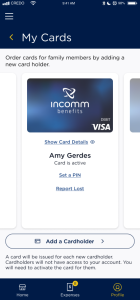
How do I set/reset my PIN?
You can set and reset your PIN from the mobile app or website following these steps:
- Navigate to the My InComm Benefits Card screen.
- Select the “Change PIN” option for the appropriate card.
- Enter a 4-digit PIN then re-enter the same 4-digits PIN and Submit.
Your PIN is now set and can be used to complete transactions.
What if I receive a card decline for an ineligible item but I’m confident it’s eligible?
In some cases, eligible items are not set up correctly in a merchant’s point-of-sale system. If you receive a card decline for an item you know is eligible, you can easily create an expense and submit the claim for reimbursement. Just be sure to attach your itemized receipt before submitting. See our Reimbursement & Claims FAQ to learn more.
Why did I not receive a notification when my card was declined?
Some merchants have not yet complied with Visa/Mastercard guidelines on the acceptance of some HSA and FSA cards, and hence, their point-of-sale systems summarily decline the cards, and InComm Benefits is unable to send a notification.
If you encounter such a situation, please send details of the store/merchant to support@incommbenefits.com so InComm Benefits can advise you on any known problems. In this instance, please use an alternate payment method and reimburse your expenses from the mobile app or website, as appropriate.
What if I lose my card?
You can report a card lost from the mobile app or website. Navigate to the “My InComm Benefits Card” screen and select the “Report Lost” action for the appropriate card. We will cancel the current card and re-issue you a new one. New cards generally take 5-7 business days to arrive in the mail.
What can an authorized user do?
InComm Benefits allows you to designate any cardholder you’ve added as an authorized user who can receive help or account services from member support.
Authorized users may:
- Receive account information (but not act on) account balance, plan information, transaction information or payment details
- Take action on their own card: activate, report lost or stolen
- Can be assisted with online navigation such as reimbursement help
Authorized users cannot do the following:
- Close the account
- Add a beneficiary
- Add an additional cardholder
- Add an additional authorized user
- Update account information
- Can not be assisted with online access (i.e. username or password resets)
- Can not be assisted with help on investments
InComm Benefits Interest Rates
InComm Benefits offers the following interest rates on money held in HSA spending accounts. We recommend for the best interest rates, that you open an investment account and make use of the money market fund offered there. You can learn more about this choice here: Schwab Government Money Inv (SNVXX)
| Balance | Interest | APY |
|---|---|---|
| $.01-$2,000.01 | 0.00% | 0.00% |
| $2,000.01-$5,000.00 | 0.00% | 0.00% |
| $5,000.01-$10,000.00 | 0.00% | 0.00% |
| $10,000.01+ | 0.00% | 0.00% |
Qualifying Expenses
This document is a helpful tool to identify common qualifying, potentially qualifying & not qualifying expenses relating to your InComm Benefits account(s). More information on these expense types below:
Qualifying Expense
These are expenses that are generally considered to be used or prescribed primarily for medical care. Any use for other than medical care would be rare. It is assumed also that all expenses in this category are legally procured. Services, treatments or items that are not legally procured are not Qualifying Expenses, even if otherwise for medical care. For example, prescription drugs to treat a medical condition are not qualifying expenses if procured internationally in violation of federal law.
Potentially Qualifying Expense
Such expenses are largely “dual-purpose” expenses. “Dual purpose” expenses are expenses that have both a medical purpose and a personal, cosmetic, or general health purpose. These expenses qualify for reimbursement under a health FSA, HRA or a tax-free distribution from an HSA only if there is appropriate proof that the item or service was incurred or obtained primarily for medical care. In other words, it would not have been incurred but for a medical condition. In such cases, a “Letter of Medical Necessity” from a medical practitioner prescribing the item or service to treat a medical condition is required.
Not a Qualifying Expense
These are expenses in one of the following categories:
- Items or services that are generally known to be incurred or obtained in almost all cases for personal, cosmetic, or general health purposes and not primarily for medical care.
- Items or services for which reimbursement is not allowed under statutory or regulatory provisions governing health FSAs, HRAs, or HSAs, even if they might seem to be for medical care (for example, insurance premiums cannot be reimbursed by a health FSA).
| Expense | Is Expense a Qualifying Expense? | Comments and Special Rules |
|---|---|---|
| Acne treatment | Potentially qualifying expense | Routine skin care is not a qualifying expense. Products that have both cosmetic and medical purposes (e.g. Retin A) should be accompanied with a Letter of Medical Necessity. |
| Activity tracker | Potentially qualifying expense | Only with a Letter of Medical Necessity. |
| Acupuncture | Qualifying expense | |
| Air conditioner | Potentially qualifying expense | Only with a Letter of Medical Necessity. See also Capital expenses. |
| Air purifier | Potentially qualifying expense | Only with a Letter of Medical Necessity. See also Capital expenses. |
| Alcoholism treatment | Qualifying expense | |
| Allergy medicine | Qualifying expense | |
| Allergy treatment products other than drugs and medicine (e.g., household improvements to treat allergies) | Potentially qualifying expense | Only with a Letter of Medical Necessity. Only the cost of an improvement to a product or item typically used in the home (e.g. a HEPA filter added to vacuum cleaner) is reimbursable. |
| Alternative healers (not licensed by a state as a health care provider) | Potentially Qualifying Expense | Only fees for medical care qualify. A Letter of Medical Necessity from a health care practitioner may be required to confirm medical condition if treatment is dual purpose. See also Christian Science practitioners. |
| Ambulance | Qualifying expense | |
| Analgesics (Examples: Advil, Aspirin, Tylenol) | Qualifying expense | |
| Anesthesia | Potentially Qualifying expense | Qualifies as medical care if administered in connection with a service or treatment that is also a qualifying medical expense. |
| Antacids (Examples: Maalox, Prilosec OTC, Zantac) | Qualifying expense | |
| Antibiotic ointments (Examples: Neosporin, Polysporin) | Qualifying expense | |
| Antihistamines | Qualifying expense | |
| Anti-itch creams | Qualifying expense | |
| Apps and Programs for phones or computers | Potentially qualifying expense | Only with a Letter of Medical Necessity |
| Arthritis gloves | Qualifying expense | |
| Artificial limbs | Qualifying expense | |
| Artificial teeth | Qualifying expense | |
| Aspirin | Qualifying expense | |
| Asthma medicines, treatments, and medicine delivery devices | Qualifying expense | |
| Automobile modifications, adaptive | Potentially qualifying expense | Only with a Letter of Medical Necessity |
| Baby monitor | Potentially qualifying expense | Only with a Letter of Medical Necessity |
| Bactine | Qualifying expense | |
| Bandages | Qualifying expense | |
| Batteries | Potentially Qualifying expense | Only to operate a device that is also a qualifying expense |
| Birth-control pills | Qualifying expense | |
| Birthing classes | Potentially qualifying expense | See Lamaze and newborn classes |
| Blood-pressure monitoring devices | Qualifying expense | |
| Blood storage | Potentially qualifying expense | Only where blood collected in connection with and necessary to treat a condition, which the IRS has not defined. Also, storage must be “temporary” (i.e. for use in the imminent future). |
| Blood-sugar test kits and test strips | Qualifying expense | |
| Body scans | Qualifying expense | |
| Books, health-related | Potentially qualifying expense | Only with a Letter of Medical Necessity |
| Botox | Potentially eligible expense | Only with a Letter of Medical Necessity |
| Braille books and magazines | Qualifying expense | Only amounts above the cost of regular printed books qualify. |
| Breast milk shipping and delivery | Not a qualifying expense | |
| Breast pumps | Qualifying expense | Expenses for extra bottles for food storage will not qualify, nor will items and devices that do not help with lactation but merely make it more convenient (e.g., special bras). |
| Breast reconstruction surgery following mastectomy | Qualifying expense | |
| Breastfeeding classes | Qualifying expense | |
| Breathalyzer | Qualifying expense | |
| Calamine lotion | Qualifying expense | |
| Calcium supplements | Potentially qualifying expense | Only with a Letter of Medical Necessity. |
| Cancer screenings | Qualifying expense | |
| Canes | Potentially Qualifying expense | Only with a Letter of Medical Necessity |
| Capital expenses | Potentially qualifying expense | Improvements or special equipment added to a home or other capital expenditures (such as automobile modifications) may qualify with a Letter of Medical Necessity. However, the portion of the expense that permanently improves the property does not qualify. |
| Car seats | Not a qualifying expense | |
| Carpal tunnel wrist supports | Qualifying expense | |
| Chelation therapy | Qualifying expense | |
| Childbirth classes | Potentially qualifying expense | See Lamaze and newborn classes |
| Chiropractors | Qualifying expense | |
| Cholesterol test kits | Qualifying expense | |
| Chondroitin | Potentially qualifying expense | Only with a Letter of Medical Necessity. See Nutritional supplements |
| Christian Science practitioners | Potentially qualifying expense | Only fees for services for medical care qualify. A Letter of Medical Necessity from a health care practitioner may be required if services are dual purpose. |
| Circumcision | Qualifying expense | |
| Classes, health-related | Potentially qualifying expense | Only with a Letter of Medical Necessity |
| Coinsurance amounts | Potentially Qualifying expense | Only in connection with services/treatments that are also qualifying expenses |
| Cold medicine | Qualifying expense | |
| Cold/hot packs (sold as medical supplies) | Qualifying Expense | |
| Cold sore medicine | Qualifying expense | |
| Colonoscopies | Qualifying expense | |
| Compression hose | Potentially qualifying expense | If regular hose has a compression component. Need a Letter of Medical Necessity and then only the excess cost over regular hose qualifies. Hose that is solely used for compression purposes qualifies with a Letter of Medical Necessity. |
| Concierge fees | Potentially qualifying expense | Fees for priority access and/or preference are NOT qualifying. Fees that relate to actual services (or that can be allocated to actual services) are qualifying. |
| Condoms | Qualifying expense | |
| Constipation medicine | Qualifying expense | |
| Contact lenses, cases, materials, and equipment | Qualifying expense | Note that contact lenses with no correction purpose (e.g. color lenses) and corresponding supplies are not qualifying. |
| Contraceptives | Qualifying expense | |
| Copayments | Potentially Qualifying expense | Only in connection with services/treatments that are qualifying expenses |
| Corn and callus remover | Qualifying expense | |
| Cosmetics and cosmetic procedures that aren’t necessary to correct a deformity from a birth defect, illness or injury. | Not a qualifying expense | |
| Cough suppressants | Qualifying expense | |
| Counseling | Potentially qualifying expense | Only with a Letter of Medical Necessity |
| COVID-19 tests | Qualifying expense | |
| COVID-19-related personal protective equipment (PPE) | Qualifying expense | |
| CPAP (continuous positive airway pressure) devices | Qualifying expense | |
| CPR classes | Not a qualifying expense | |
| Crowns, dental (not for purely cosmetic purposes) | Qualifying Expense | |
| Crutches | Qualifying expense | |
| Decongestants | Qualifying expense | |
| Deductibles associated with services or treatments that are also qualifying | Qualifying expense | |
| Dental items used on a daily basis, such as toothpaste and dental floss | Not a qualifying expense | See Toothpaste |
| Dental services, supplies and procedures (for other than purely cosmetic purposes, such as whitening or that are part of everyday routine such as toothpaste, dental floss and mouthwash) | Qualifying expense | |
| Dentures, denture adhesives, and denture cleaners | Qualifying expense | |
| Deodorant | Not a qualifying expense | Even if prescribed to treat a medical condition. |
| Dermatologist (for other than purely cosmetic purposes) | Qualifying expense | |
| Diabetic socks | Qualifying expense | But only the excess cost of the sock over a regular sock qualifies |
| Diabetic supplies | Qualifying expense | |
| Diaper rash ointments and creams | Qualifying expense | |
| Diapers or diaper service | Potentially qualifying expense | Only with a Letter of Medical Necessity |
| Diarrhea medicine | Qualifying expense | |
| Diet foods | Not a qualifying expense | See also Special foods |
| Disabled dependent care expenses | Potentially qualifying expense | Such expenses will qualify if the expenses are for medical care of a dependent who is disabled. |
| DNA collection and storage | Potentially qualifying expense | May be eligible where the DNA is collected and temporarily stored as part of the diagnosis, treatment, or prevention of an existing or imminent medical condition. See also Blood storage. |
| Doula | Potentially qualifying expense | Only to the extent of the medical care provided. See also Midwife. |
| Drug addiction treatment | Qualifying expense | |
| Drug overdose treatment | Qualifying expense | |
| Drug-testing kits for home use | Qualifying expense | |
| Durable medical equipment | Qualifying expense | |
| Dyslexia treatment | Potentially qualifying expense | See Language training. See also School and education. |
| Ear drops and wax removal products | Qualifying expense | |
| Ear plugs | Potentially qualifying expense | Only with a Letter of Medical Necessity |
| Eczema treatments | Qualifying expense | |
| Egg donor fees | Potentially qualifying expense | Amounts paid for the egg donor fee, an agency fee, an egg donor's medical and psychological testing, and the legal fees for preparation of the egg donor contract will qualify if such services are for the participant or a covered dependent. |
| Eggs and embryos, storage fees | Potentially qualifying expense | See Blood storage |
| Electrolysis or hair removal | Not a qualifying expense | See Cosmetic procedures |
| Exercise equipment or programs | Potentially qualifying expense | Only with a Letter of Medical Necessity |
| Expectorants | Qualifying expense | |
| Eye drops | Qualifying expense | |
| Eye examinations, eyeglasses, equipment, and materials | Qualifying expense | |
| Eyeglass repair kits | Qualifying expense | |
| Face creams | Not a qualifying expense | See Cosmetics and cosmetic procedures. |
| Feminine hygiene products (e.g., cleansing products and deodorants) | Not a qualifying expense | See Menstrual products |
| Fertility monitors | Qualifying expense | |
| Fertility treatments | Potentially qualifying expense | Will qualify to the extent that procedures are performed on the participant or a covered dependent. See also Egg and embryos, storage fees. |
| Fever-reducing medications | Qualifying expense | |
| Fiber supplements | Potentially qualifying expense | Only with a Letter of Medical Necessity |
| First aid cream | Qualifying expense | |
| First aid kits | Qualifying expense | |
| Fitness programs | Potentially qualifying expense | Only with a Letter of Medical Necessity |
| Flu shots | Qualifying expense | |
| Fluoride rinses | Potentially qualifying expense | Only with a Letter of Medical Necessity |
| Foods-Regular Food | Not a qualifying expense | Not a qualifying expense even if prescribed for a medical condition. See Special foods |
| Genetic testing and counseling | Potentially qualifying expense | Only with a Letter of Medical Necessity |
| Glucosamine | Potentially qualifying expense | Only with a Letter of Medical Necessity |
| Glucose-monitoring equipment | Qualifying expense | |
| Hand sanitizer or hand-sanitizing wipes | Potentially qualifying expense | Only with a Letter of Medical Necessity |
| Headache medications | Qualifying expense | |
| Health care sharing ministries, payments for | Not a qualifying expense | |
| Health institute fees | Potentially qualifying expense | Only with a Letter of Medical Necessity |
| Hearing aids | Qualifying expense | |
| Hemorrhoid creams or ointments, medicated | Qualifying expense | |
| Hemp or cannabidiol (CBD) products | Potentially qualifying expense | Only with a Letter of Medical Necessity |
| Herbs | Potentially qualifying expense | Only with a Letter of Medical Necessity |
| Hormone replacement therapy (HRT) | Potentially qualifying expense | Only with a Letter of Medical Necessity |
| Hospital services | Qualifying expense | |
| Household help (not nursing services) | Not a qualifying expense | |
| Humidifier | Potentially qualifying expense | Only with a Letter of Medical Necessity. See also Capital expenses |
| Hydrotherapy | Potentially qualifying expense | Only with a Letter of Medical Necessity |
| Hypnosis | Potentially qualifying expense | Only with a Letter of Medical Necessity |
| Immunizations and Vaccines | Qualifying expense | |
| Incontinence supplies | Qualifying expense | |
| Infant formula | Potentially qualifying expense | Regular formula doesn’t qualify. If a special formula is prescribed to treat a medical condition, only the cost in excess of regular formula qualifies. See Special foods |
| Insect-bite creams and ointments (Examples: Benadryl, Cortaid) | Qualifying expense | |
| Insect repellent (Examples: Cutter, OFF!) | Qualifying expense | |
| Insulin and related equipment | Qualifying expense | |
| Insurance premiums | Potentially qualifying expense | Health FSA: Insurance premiums are not qualifying expenses. HSA: Payments for health insurance premiums or contributions for self-funded health coverage generally aren't qualifying expenses. However, the following premiums will qualify for reimbursement from an HSA: COBRA coverage, a qualified long-term care insurance contract, any health plan maintained while the individual is receiving unemployment compensation under federal or state law, or, for those age 65 or older (whether or not they are entitled to Medicare), any deductible health insurance (e.g., retiree medical coverage) other than a Medicare supplemental policy. Note that long-term care insurance premium reimbursements in excess of the indexed annual limit will be treated as taxable and may be subject to the additional tax on distributions not used for qualified medical expenses. HRA: The following premiums are qualifying expenses: premiums for traditional health insurance (including dental or vision coverage and COBRA) and qualified long-term care insurance. Note that reimbursing premiums for individual policies raises concerns under COBRA, ERISA, and other laws, and that reimbursing premiums for individual health insurance policies that provide major medical coverage (i.e., coverage that is subject to health care reform’s mandates) will generally violate health care reform’s annual limit and preventive care mandates (a limited exception applies for individual coverage HRAs (ICHRAs) beginning in 2020). Also, qualified long-term care premium reimbursements are subject to an indexed annual limit. The following insurance premiums are not qualifying expenses: premiums for employer-sponsored group health coverage that could be paid on a pre-tax basis under the employer's cafeteria plan, LTD insurance, fixed indemnity cancer insurance, and hospital indemnity insurance. |
| Invisalign | Qualifying expense | |
| IVF (in vitro fertilization) | Potentially qualifying expense | See Surrogate expenses |
| Laboratory fees | Qualifying expense | |
| Lactation consultant | Qualifying expense | |
| Lactose intolerance tablets | Qualifying expense | |
| Lamaze and birthing classes | Potentially qualifying expense | Expenses for Lamaze or other methods of childbirth education may qualify to the extent that instruction relates to birth and not childrearing. |
| Language training (other than regular schooling) | Potentially qualifying expense | Only with a Letter of Medical Necessity |
| Laser eye surgery, Lasik | Qualifying expense | |
| Late fees (e.g., for late payment of bills for medical services) | Not a qualifying expense | See Sales tax |
| Latex gloves | Potentially qualifying expense | Only with a Letter of Medical Necessity |
| Laxatives (Examples:Ex-Lax, Miralax) | Qualifying expense | |
| Lead-based paint removal | Potentially qualifying expense | Only with a Letter of Medical Necessity |
| Lens wipes | Qualifying expense | |
| Lice treatment | Qualifying expense | |
| Lip products, medicated | Qualifying expense | |
| Liquid adhesive for small cuts | Qualifying expense | |
| Lodging at a hospital or similar institution to receive medical care (for patient) | Qualifying expense | |
| Lodging not at a hospital or similar institution (patient and companion) | Potentially qualifying expense | Up to $50 per night (each for patient and 1 companion) will qualify if these conditions are met: (1) The lodging is primarily for and essential to medical care; (2) the medical care is provided by a physician in a licensed hospital or medical care facility related to (or equivalent to) a licensed hospital; (3) the lodging isn't lavish or extravagant; and (4) there is no significant element of personal pleasure, recreation, or vacation in the travel. |
| Lodging of a companion | Potentially qualifying expense | Will qualify if accompanying a patient for medical reasons and all of the conditions described under Lodging not at a hospital or similar institution are also met. |
| Long-term care services | Potentially qualifying expense | HSA: Long-term care services will qualify for reimbursement to the extent that the services otherwise qualify as medical care expenses. Health FSA: Qualified long-term care services (defined as certain services that a chronically ill individual requires and that are prescribed by a licensed health care practitioner under a plan of care) cannot be reimbursed on a tax-free basis, even if they otherwise qualify as medical care expenses. (To be chronically ill, an individual must be unable to perform two or more daily living activities for at least 90 days without substantial assistance from another individual, or have a severe cognitive impairment that requires substantial supervision to protect him or her from threats to health and safety.) Furthermore, a health FSA likely cannot provide taxable reimbursement of such services, and it is unclear whether “nonqualified” long-term care services can be reimbursed to the extent that the services otherwise qualify as medical care expenses. HRA: For HRAs that are health FSAs, the health FSA rules will apply (see above). HRAs that are not health FSAs should be able to reimburse qualified long-term care expenses that otherwise qualify as medical care expenses. |
| Masks or face shields, reusable or disposable | Potentially qualifying expense | Only with a Letter of Medical Necessity |
| Massage therapy | Potentially qualifying expense | Only with a Letter of Medical Necessity |
| Maternity clothes | Not a qualifying expense | |
| Mattresses | Not a qualifying expense | Only with a Letter of Medical Necessity and then only the excess cost qualifies. |
| Meals at a hospital or similar institution | Potentially qualifying expense | Meals that are part of the cost of inpatient care at a hospital or similar institution will qualify if a principal reason for the recipient’s being there is to receive medical care; the meals must be furnished as a necessary incident to the individual’s continuing medical care. Meals that are not part of inpatient care generally won’t qualify. |
| Meals not at a hospital or similar institution | Not a qualifying expense | It is unclear whether meals provided at a hospital or similar institution for an outpatient who must remain at the institution for continuing care for some period (e.g., following a medical procedure) would qualify. |
| Medical alert bracelet or necklace | Qualifying expense | |
| Medical conference admission, transportation, meals, etc. | Potentially qualifying expense | Expenses for admission and transportation to an “essential” medical conference qualify to the extent the conference relates to a chronic disease suffered by a participant or covered dependent. The expenses of meals and lodging while attending the conference don't qualify. |
| Medical information plan charges | Qualifying expense | These are expenses paid to a plan to keep medical information so that it can be retrieved from a computer databank for the medical care of you, your spouse, or another individual whose expenses are eligible for tax-free reimbursement. |
| Medical monitoring and testing devices | Qualifying expense | |
| Medical records charges | Qualifying expense | |
| Menstrual care products | Qualifying expense | |
| Menstrual pain relievers | Qualifying expense | |
| Midwife | Qualifying expense | |
| Mineral supplements | Potentially qualifying expense | Only with a Letter of Medical Necessity |
| Missed appointment fees | Not a qualifying expense | |
| Motion sickness pills (Examples: Bonine, Dramamine) | Qualifying expense | |
| Motion sickness wristbands | Qualifying expense | |
| Mouthwash (regular) | Not a qualifying expense | |
| Mouthwash (special) | Potentially a qualifying expense | Only with a Letter of Medical Necessity |
| Multivitamins (Example: One-a-Day) | Potentially qualifying expense | Only with a Letter of Medical Necessity |
| Nasal strips or sprays (other than marketed for athletic performance) | Qualifying expense | |
| Naturopathic healers | Potentially qualifying expense | See Alternative healers |
| Nicotine gum or patches | Qualifying expense | |
| Norplant insertion or removal | Qualifying expense | |
| Nursing services for a healthy baby | Not a qualifying expense. | |
| Nursing services provided by a nurse or other attendant | Potentially qualifying expense | Only for services that qualify as medical care. Any portion of the fee allocable to “household services” doesn’t qualify. |
| Nutritional supplements | Potentially qualifying expense | Only with a Letter of Medical Necessity |
| Nutritionist's professional expenses | Potentially qualifying expense | Only with a Letter of Medical Necessity |
| Obstetrical expenses | Qualifying expense | |
| Occlusal guards to prevent teeth grinding | Qualifying expense | |
| Occupational therapy | Qualifying Expense | |
| Omega-3 supplements | Potentially qualifying expense | Only with a Letter of Medical Necessity |
| Online or telephone consultation, medical practitioner’s fee | Qualifying expense | |
| Operations | Qualifying expense | |
| Optometrist | Qualifying expense | |
| Orthodontia | Qualifying expense | |
| Orthopedic shoe inserts | Potentially qualifying expense | Only with a Letter of Medical Necessity |
| Orthopedic shoes | Potentially qualifying expense | Only with a Letter of Medical Necessity and then only the excess cost qualifies. |
| Osteopath fees | Qualifying expense | |
| Ovulation monitor | Qualifying expense | |
| Oximeter | Qualifying expense | |
| Oxygen | Qualifying expense | |
| Pain relievers | Qualifying expense | |
| Payment processing fees for medical expenses | Qualifying expense | |
| Personal trainer fees | Potentially qualifying expense | Only with a Letter of Medical Necessity |
| Petroleum jelly | Potentially qualifying expense | Only with a Letter of Medical Necessity |
| Physical exams | Qualifying expense | |
| Physical therapy | Qualifying expense | |
| Pregnancy test kits | Qualifying expense | |
| Prenatal vitamins taken during pregnancy | Qualifying Expense | |
| Prescription drug or other type of discount programs/cards | Not a qualifying expense | |
| Preventive care screenings | Qualifying expense | |
| Probiotics | Potentially qualifying expense | Only with a Letter of Medical Necessity |
| Prosthesis | Qualifying expense | |
| Psychiatric care | Qualifying expense | |
| Psychoanalysis | Potentially qualifying expense | Only with a Letter of Medical Necessity |
| Psychologist | Potentially qualifying expense | Only with a Letter of Medical Necessity |
| Radial keratotomy | Qualifying expense | |
| Reading glasses | Qualifying expense | |
| Rehydration solution | Potentially qualifying expense | |
| Rental cars | Potentially qualifying expense | See Transportation |
| Rental fee, for equipment that qualifies as Medical care | Qualifying expense | |
| Retin-A | Potentially qualifying expense | Only with a Letter of Medical Necessity. See Cosmetics and cosmetic procedures |
| Rogaine | Potentially qualifying expense | Only with a Letter of Medical Necessity |
| Rubbing alcohol | Qualifying expense | |
| Safety glasses | Not a qualifying expense | |
| Sales Tax (medical services) | Qualifying expense | |
| Schools/Tuition-Regular | Potentially qualifying expense | Payments made to a residential school or program to treat an individual for behavioral, emotional, or addictive conditions (tuition, meals, and lodging) will qualify if a principal reason for attending the program is to receive medical care. (Ordinary education must be an incidental component.) Whether someone is attending to receive medical care is a question of fact that must be determined for each individual—just because a school or program provides medical care to some individuals does not mean that it provides medical care to all individuals. If a child is at a school because the courses and disciplinary methods have a beneficial effect on the child's attitude, the expenses won't qualify unless the availability of medical care in the school is a principal reason for sending the child there. |
| Schools/Tuition, special | Potentially qualifying expense | Payments made for a person with a mental or physical disability to attend a special school (tuition, meals, and lodging) will qualify if a principal reason for attending the school is to overcome or alleviate the disability. (Ordinary education must be an incidental component.) This includes teaching Braille to a person with a visual impairment, teaching lip reading to a person with a hearing disability, and remedial language training to correct a condition caused by a birth defect. If a child is at a school because the courses and disciplinary methods have a beneficial effect on the child's attitude, the expenses won't qualify unless the availability of medical care in the school is a principal reason for sending the child there. |
| Scooter, electric | Potentially qualifying expense | Only with a Letter of Medical Necessity |
| Screening tests | Qualifying expense | |
| Service animal, to assist individual with mental health disabilities | Potentially qualifying expense | Only with a Letter of Medical Necessity |
| Shipping and handling fees | Qualifying expense | |
| Sinus medications | Qualifying expense | |
| Sleep-deprivation treatment | Qualifying expense | |
| Smoking-cessation medications | Qualifying expense | |
| Smoking-cessation programs | Qualifying expense | |
| Special foods | Potentially qualifying expense | Only with a Letter of Medical Necessity and only if the food does not substitute for normal nutritional requirements. Food modified for special diets also qualifies (e.g., gluten-free) but only the cost in excess of the unmodified food qualifies. |
| Speech therapy | Qualifying expense | |
| Sperm, storage fees | Potentially qualifying expense | See Blood storage |
| Spermicides | Qualifying expense | |
| St. John's Wort | Potentially qualifying expense | Only with a Letter of Medical Necessity |
| Stem cell, harvesting and/or storage of | Potentially qualifying expense | See Blood storage |
| Sterilization procedures | Qualifying expense | |
| Student health fee | Potentially qualifying expense | See Concierge fees |
| Sunburn creams and ointments, medicated | Qualifying expense | |
| Sunglasses-Prescription | Qualifying expense | |
| Sunglasses—non-prescription | Potential qualifying expense | Only with a Letter of Medical Necessity |
| Sun-protective (SPF) clothing | Potentially qualifying expense | Only with a Letter of Medical Necessity |
| Sunscreen (excluding cosmetics or similar products containing sunscreen) | Qualifying expense | |
| Support braces | Qualifying expense | |
| Surrogate or gestational carrier expenses for other than participant or covered dependent | Not a qualifying expense | Such expenses generally won't qualify, even if they are for medical care of the surrogate/gestational carrier or her unborn child. |
| Swimming lessons | Not a qualifying expense | |
| Telephone equipment for persons with hearing or speech disabilities | Qualifying expense | See also Capital expenses |
| Television for persons with hearing disabilities | Potentially Qualifying expense | Only with a Letter of Medical Necessity and then only the excess cost qualifies |
| Thermometers | Qualifying expense | |
| Toothbrushes | Not a qualifying expense | Won't qualify, even if a dentist recommends special ones (such as electric or battery-powered) to treat a medical condition like gingivitis. Toothbrushes are items that are used primarily to maintain general health—a person would still use one even without the medical condition. Thus, they are not primarily for medical care. |
| Toothpaste | Not a qualifying expense | Same reasons that apply to toothbrushes. |
| Transplants | Qualifying expense | |
| Transportation (travel) expenses for person to receive medical care | Qualifying expense | Will qualify if the transportation is primarily for and essential to medical care. Includes car and rental car expenses; bus, taxi, rideshare, train, plane, and ferry fares; and ambulance services. Note that rental car expenses are limited to the portion attributable to the medical appointment or other care. Instead of actual car expenses, a standard mileage rate |
| Transportation (travel) expenses of someone other than the person receiving medical care | Potentially qualifying expense | Will qualify in some cases. Transportation expenses of the following persons will qualify: (1) a parent who must go with a child who needs medical care; (2) a nurse or other person who gives injections, medications, or other treatment required by a patient who is traveling to get medical care and is unable to travel alone; and (3) an individual who travels to visit a mentally ill dependent, if such visits are recommended as part of treatment. |
| Ultrasound, prenatal | Potentially qualifying expense | Will qualify if used as a diagnostic tool to determine fetal health and development. Won't qualify if for other purposes (e.g., to obtain prenatal snapshots). See also Genetic testing |
| Umbilical cord blood storage | Potentially qualifying expense | See Blood storage |
| Usual and customary charges, excess | Qualifying expense | |
| Vaccines | Qualifying expense | |
| Varicose veins, treatment of | Potentially qualifying expense | Only with a Letter of Medical Necessity |
| Vasectomy | Qualifying expense | |
| Vasectomy reversal | Qualifying expense | |
| Veneers | Not a qualifying expense | |
| Veterinary fees | Potentially qualifying expense | Will qualify if the veterinary fees are incurred for the care of a guide dog or other animal necessary for a person with a medical condition |
| Viagra | Qualifying expense | |
| Vitamins | Potentially qualifying expense | Only with a Letter of Medical Necessity |
| Walkers | Qualifying expense | |
| Wart remover treatments | Qualifying expense | |
| Weight-loss programs and/or drugs prescribed to induce weight loss | Potentially qualifying expense | Only with a Letter of Medical Necessity. Note: mere weight loss is not sufficient. |
| Wheelchair | Qualifying expense | |
| Wigs | Potentially qualifying expense | Only with a Letter of Medical Necessity |
| Wipes and cleansers, for personal (e.g., perineal) use | Potentially qualifying expense | Only with a Letter of Medical Necessity |
| Wound care | Qualifying expense | |
| X-ray fees | Qualifying expense | |
| Yeast infection medications | Qualifying expense |
Get the App or Login


Banking services are provided by Coastal Community Bank, Member FDIC. The InComm Benefits card is issued by Coastal Community Bank pursuant to a license from Visa U.S.A. Inc. InComm Benefits spending accounts are FDIC insured up to $250,000 per depositor through Coastal Community Bank, Member FDIC. Privacy notice for Coastal Community Bank can be found here.
InComm is a financial technology company, not an FDIC-insured bank. Banking services are provided by Coastal Community Bank, Member FDIC. The InComm Visa® Debit Card is issued by Coastal Community Bank pursuant to a license from Visa U.S.A. Inc. InComm spending accounts are FDIC insured up to $250,000 per depositor through Coastal Community Bank, Member FDIC. FDIC insurance only covers the failure of an FDIC-insured bank. FDIC insurance is available through pass-through insurance at Coastal Community Bank, Member FDIC, if certain conditions have been met.
Investment products are provided by Devenir Group, LLC. Investment products are not insured by Coastal Community Bank, the FDIC, or any Federal Government Agency, are not a deposit, and may lose value